Digital Signatures in E-mail
What they're for
You may have seen them, but probably don't use them: They're e-mail digital signatures.
The term digital signature does not refer to a computerized graphical representation of your handwritten name. Instead, it's a technological method of enforcing what's called information integrity. That is, a digital signature proves that:
1. The digitally signed item really did come from the purported sender, and
2. It has not been altered since it was signed.
Digital signatures can be applied to any kind of computer file, but are most commonly used:
1. With e-mail, where a sender can digitally sign a message he sends you; this proves the message came from that sender, and was not altered.
2. By software publishers, who digitally sign program files offered for download, to prove the program file is from the publisher it says it's from, and it has not been modified (with malware, for example).
3. By secure websites (which you access using the https:// prefix).
This article covers use of digital signatures with e-mail. Below, you will find out why you might consider implementing the ability to digitally sign e-mails you send, or requiring senders you do business with to sign their e-mails.
When you receive a digitally signed e-mail, you can click on web links in the message and open the attachments, and trust they will be safe—so long as you trust the person who sent you the message, and trust the sender's implementation of digital signatures. Because it is handled end-to-end, with no server support required, it is virtually impossible for some kind of virus to modify a digitally signed message in transit and add links to malicious websites, or for the message to have come from someone other than who it appears to have come from, with a properly-deployed and secured digital signature infrastructure.
Digital signatures can also prevent corporate intrigue, such as a devious businessman intercepting a competitor's messages to alter the terms of contracts, change data in reports, or otherwise surreptitiously corrupt the message or attachments.
Such attacks on e-mail integrity sound outlandish, and they are, in fact, difficult to carry out and quite rare. But, some organizations have their mail servers programmed to strip certain types of attachments or web links from e-mails that are not digitally signed, as an anti-malware measure.
Another potentially valuable use of digital signatures involves requiring your business partners to sign messages they send to you. For example, let's say you're a wholesaler and want to accept orders from your retail business customers via e-mail for convenience, or you're a financial services provider and your clients e-mail their transaction requests to you. If you require your customers or clients to digitally sign their messages, they cannot claim that someone sent an unauthorized order if they later change their mind. When used in this fashion, you are said to be enforcing non-repudiation.
What they look like
When you receive a digitally signed e-mail in Microsoft Outlook 2010, it will usually be displayed in your inbox with an icon that looks something like  , as opposed to the normal icon that looks like
  . When you open the message, you might see
  in the header area, or information about who signed the e-mail and whether there are any problems with the digital signature.
In Microsoft Outlook 2013 and 2016, with simplified icons, you will see  in the inbox and in the e-mail itself.
If you use Thunderbird, look for this icon: 
Mac Mail shows this in the header of signed messages: 
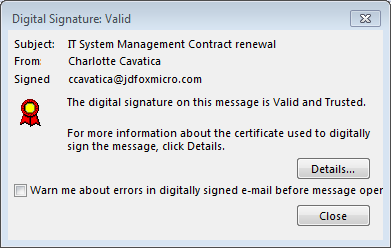
When you open the message, you should be able to click on the icon and get details about the digital signature. In Outlook 2016, for example, you will see something like this:
How they work
Digital signatures work using highly complex mathematical computations, combined with digital certificates and the PKI system.
A digital certificate is a computer file used for identification. To send signed e-mail, you have to get your own digital certificate first. A digital certificate is sometimes referred to as a Digital ID.
The PKI system is a standard method by which your computer confirms the validity and authenticity of other people's Digital IDs. Your computer does this by innately trusting certain Digital ID issuers, such as Comodo, Entrust, GlobalSign, GeoTrust, and VeriSign (now Symantec). All modern computers, tablets, and phones already have the software necessary to recognize and verify any Digital ID that was issued by all the major providers of Digital IDs.
Using data from a verified Digital ID attached to the e-mail message in question, your computer can perform computations to see whether anything has been changed in the message (including the name of the sender). Because of the complexity of these computations, it is virtually impossible for someone to forge a Digital ID or digital signature using technological means. If the calculations do not add up, your e-mail program will inform you that the message has been modified in transit, or didn't come from whom it purports to.
Keep in mind that digital signatures are not to be confused with encryption. Even though both use cryptography, e-mail encryption scrambles the contents of messages to ensure confidentiality, but it does not ensure integrity the way a digital signature does because it doesn't involve the sender's Digital ID. An e-mail message can be encrypted and digitally signed at the same time, ensuring both integrity and confidentiality.
E-mail client support
Although digital signatures for e-mail have been around for many years, many e-mail programs do not support them at all.
A sender's Digital ID and digital signature information is contained in a single e-mail attachment, which is generated by the sender's e-mail software when the sender signs the message. The attachment conforms to a protocol called S/MIME. If you see reference to S/MIME in the documentation for your e-mail client software, then it supports digital signatures.
As mentioned above, Microsoft Outlook, Thunderbird, and Mac Mail are common e-mail applications that support digital signatures.
Free web-based e-mail services, such as Yahoo! Mail, AOL, Apple iCloud, and Microsoft Outlook.com (formerly Hotmail), do not support digital signatures in a web browser. However, if a given web-based service allows you to connect with a conventional desktop or mobile e-mail application that supports digital signatures (such as Outlook, Thunderbird, or Mac Mail), then you will be able to access all digital signature functions your client supports. This is because digital signatures are handled by the e-mail senders' and recipients' software, not the e-mail servers or the e-mail providers' systems.
Some web-based systems do support validation of digital signatures, and signing outbound e-mails, within your web browser, requiring an add-on or extension to the browser to handle Digital IDs and do the computations. These include the Google Chrome browser accessing a Google G Suite mailbox (Enterprise plan only), and Microsoft Internet Explorer accessing a Microsoft Exchange Server account or an Office 365 account with Exchange Online. But, these have additional problems and limitations that are beyond the scope of this article to describe in detail.
Bottom line, if you get a digitally signed e-mail and you don't see any such icon or other indication that the message is signed, this means the e-mail application or browser you're using does not support digital signatures, or needs further configuration. In such a case, you may see a strange attachment that you can't open (such as a file named smime.p7s); this is the signature data, intended to be used by your e-mail program to verify the message. Some programs that don't handle signatures will nonetheless recognize the attachment and hide it from view.
Other difficulties and caveats
Even the most common e-mail software, such as Microsoft Outlook and Mac Mail, to this day do not handle e-mail signatures in a user-friendly and intuitive manner. This can reduce their effectiveness.
For example, part of the value of a digital signature is the confirmation of who sent the message. But, it is possible for a crook to get an e-mail address that is similar to someone you know, and then get a Digital ID issued in that person's name for the fake e-mail address. If this impostor sends you a signed e-mail, the Digital ID itself will give you clues that it may not be from the impersonated individual. However, most e-mail programs do not automatically display this information; you would have to decide to click your way into where that information is, and, when you do, you might have difficulty interpreting what you find if you're not familiar with examining Digital IDs.
Some programs actually assist potential impostors. For example, Mac Mail shows only the full name of the sender, so someone can use any e-mail address, get a free Digital ID with someone else's name, and send you a message that appears to be signed by that person. You wouldn't know unless you click the icon, then click Details to see the actual e-mail address he sent it from.
Microsoft Outlook does nicely display the actual e-mail address of the signer, but if there are any problems with the certificate (indicating an impostor), or even if the e-mail address of the sender doesn't match what's on the certificate, it is configured by default not to warn you! So if you don't happen to eyeball it every time, an impersonator can be easily successful.
Finally, part of the strength of the system's integrity is that it is handled by the computer or device of the sender and receiver, without requiring server support. But, this means that for users that use multiple devices, the Digital IDs, compatible e-mail client software and/or any necessary browser add-ons have to be properly configured on every device. This can present a challenge in organizations where devices are shared, or users utilize non-company devices for business e-mail.
These problems can be overcome through a good training program for your users and associates, and—for larger or dynamic groups—a competent IT department. But this difficulty, combined with such limited support in e-mail clients, explains why e-mail digital signatures are not widely used.
Cloud options
Some companies offer cloud-based e-mail digital signing. With these services, your Digital ID is stored on the cloud provider's servers, and you can then sign e-mails via a mobile app, or in your browser. This is generally much easier to set up than with conventional e-mail client software. But, as you'll learn the next section (how to get a Digital ID), this can reduce the value of e-mail digital signatures for non-repudiation.
How you can use digital signatures
If you work for a large organization, such as the Department of Defense, you may already have Digital IDs assigned to you and installed on your system or present on a smart card you use to log in to your computer, making it easy to sign your messages.
If not, you can learn how to get a Digital ID for signing e-mail. If you want to require your vendors or customers to send digitally signed e-mails for certain business transactions, you should direct them to this article and the above link as well.
For more information and help setting up your system to allow for digital signatures, encryption, and all the other modern technologies and methods available to ensure confidentiality and integrity, please contact J.D. Fox Micro.
Legal Note
In this article, we described the probative capabilities of digital signatures, such as "non-repudiation". Digital IDs, the PKI system, and your software only perform the technical aspect of these functions, though, and do not necessarily have intrinsic forensic value. If you plan to implement Digital IDs into your business processes for these purposes, please ensure that you also put relevant policies, procedures, user training, and contracts in place that are necessary to provide the level of legal protection you seek.
Click here to learn how to get a Digital ID.
Click here to jump to the links to issuers of Digital IDs for e-mail.